- Published on
How to contribute to MDN?
- Authors

- Name
- Benjamin Lesné
- @LesneBenjamin
Find the issue
Pick an easy issue that excites you in the content repository of MDN.
For example, here is the one I did
Setup the project on your machine
For your information, this blog post is based on the MDN official guidelines
Clone the repository
Go to the MDN/content repository
Then, click on this beautiful fork button middle top right of the page
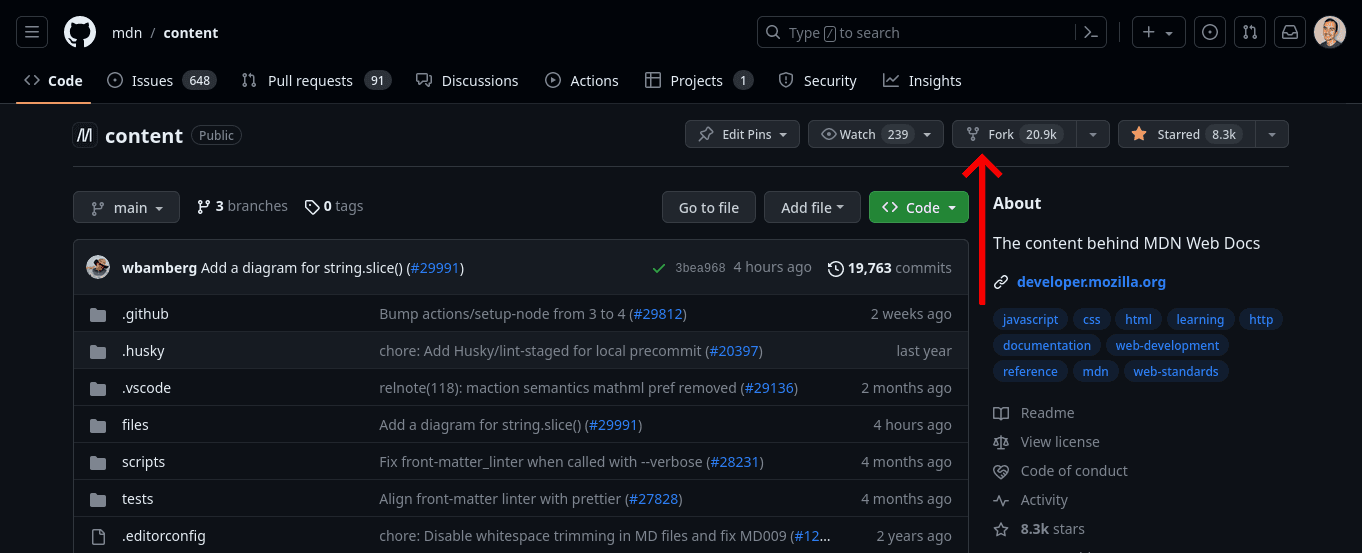
Now, you should get into a page with a button Create fork, press this bad boy.
It should redirects you to :
https://github.com/[your github username]/content
Now clone the repository on your machine:
- with SSH:
cd folder/of/your/choice/content
yarn
yarn start
git clone git@github.com:[your github username]/content.git
or
- with HTTP:
cd folder/of/your/choice/content
yarn
yarn start
git clone https://github.com/[your github username]/content.git
Install dependencies
I assume that you have yarn and node installed already, if not :
click here
The easy way to install node for windows and macos is this page.
For linux : using your package manager seems easier. From there, good luck 🫡
For more info see the official node documentation
Now you can install yarn like this :
npm install --global yarn
Now cd to the repository you just cloned, install the dependencies with yarn and start the server :
cd folder/of/your/choice/content
yarn install
yarn start
Now, if you go to http://localhost:5042/ you should see the MDN documentation
How to edit files
Your are supposed to have read the following before doing any change :
These are verbose no one wants to read that...
So, since your are probably doing a small effort issue that require a small amount of changes, you can code first and then read the parts you need with the changes you made. And I guess you good, worst scenario you change the few lines you added 🤷
Tip: If the page you are supposed to fix is :
https://developer.mozilla.org/en-US/docs/Web/JavaScript
then you know that the path of the file you have to work on is :
rootFolder/files/en-us/docs/web/javascript
And then?!
All you have to do is push your changes. (don't forget to check the writing guidelines)
git add .
git commit -m "fix stuff"
git push
You might need to git push --set-upstream origin [your branch name] if you haven't pushed this branch before.
Now, go to your forked repository:
https://github.com/[your github username]/content
And click on "Compare & pull request"
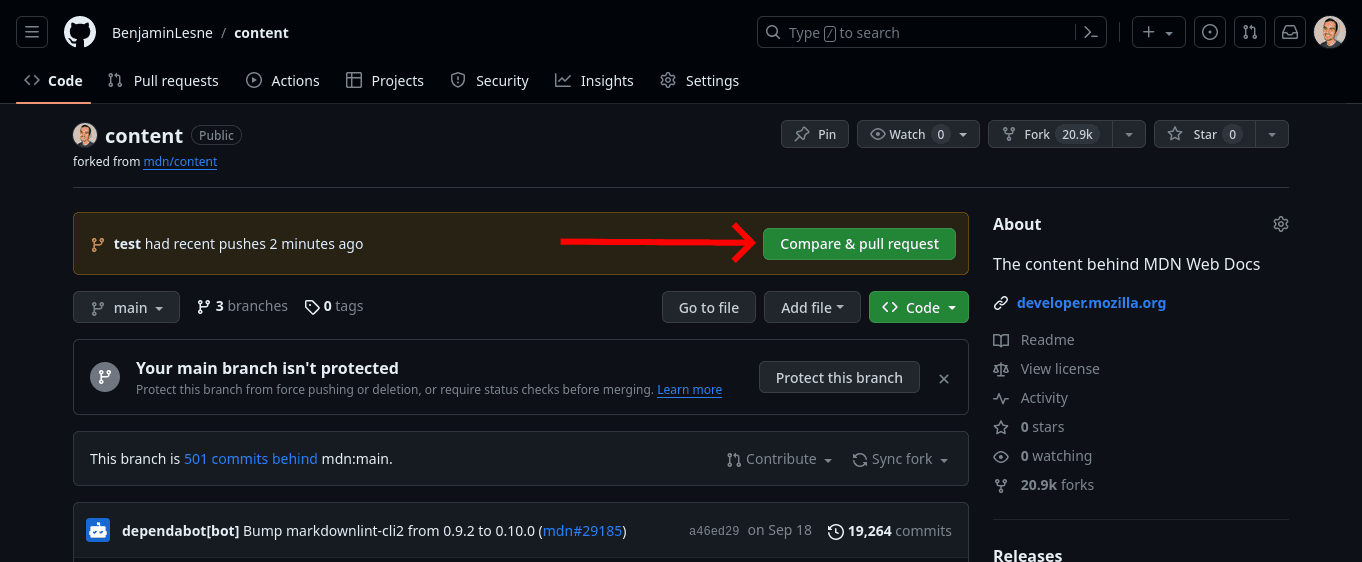
You should get into a page with a description prefilled with :
<!-- 🙌 Thanks for contributing to MDN Web Docs. Adding details below will help us to merge your PR faster. -->
### Description
<!-- ✍️ Summarize your changes in one or two sentences -->
### Motivation
<!-- ❓ Why are you making these changes and how do they help readers? -->
### Additional details
<!-- 🔗 Link to release notes, vendor docs, bug trackers, source control, or other places providing more context -->
### Related issues and pull requests
<!-- 🔨 If this fully resolves a GitHub issue, use "Fixes #123" -->
<!-- 👉 Highlight related pull requests using "Relates to #123" -->
<!-- ❗ If another pull request should be merged first, use "**Depends on:** #123" -->
<!-- 👷♀️ After submitting, go to the "Checks" tab of your PR for the build status -->
When everything is good, the title, the description, the changes and also that the pull request is from your branch TO the base repository MDN/content (this should be set automatically).
Click create pull request and you good. Congrats you made your first pull request to an open-source project. Now keep an eye for any comment or approval from the MDN team (they usually do it in few hours or the next day).
This contribution is one of the ingredients to make your resume shine. If you are interested I wrote a post on How to find your first dev job.
That's it. Bye. 👋
sources: